Visual editor (MeTTaGrapher)
MeTTaGrapher shows a MeTTa program two ways and lets you build, edit, and run it in your browser: as a node graph of connected boxes, and as nested blocks where a form contains its arguments. Both are the same thing, a MeTTa atom, so the Graph and Blocks buttons at the top left switch between them, and either one runs on the same interpreter as the rest of the site.
Pick an example, switch views, edit a term, and press Play to watch it reduce.
The examples cover nested arithmetic, a recursive rule with a conditional (fact), pattern matching over facts (grandparent), nondeterminism (a coin with two rules), and a small typed Peano program.
Try it right here
The editor above is live, and nothing it does talks to a server: the whole interpreter is TypeScript running in your browser, the same engine every code block on this site uses. A few things to do with it right now:
- Press the Recursion example, then Play, and watch
(fact 5)fold up to120. Pull the speed slider down first if you want to follow it slowly. - Switch to Blocks and press Play again. It is the same reduction drawn as nested boxes instead of wires; keep whichever reads better to you.
- Play it out and watch a single step: a soft glow marks the subterm being rewritten, and when the step finishes its consumed pieces travel into the result and melt together, the way droplets merge.
- In the graph, drag a node by its body to move it. Drag the small dot at the very top of a node onto another node to connect it as a child, or onto empty space to detach it.
- Double-click a subterm like
(* 25 2)to reduce just that part, one step.
Every example on the other pages of this site has a Visualize button too: press it under any runnable snippet to open this same editor, loaded with that snippet's code, and step or play it there.
The rest of this page explains each of these in more depth.
Two views
The two are the same reduction drawn differently. Here is (fact 5) folding to 120 in both at once, the node graph on the left and the nested blocks on the right:
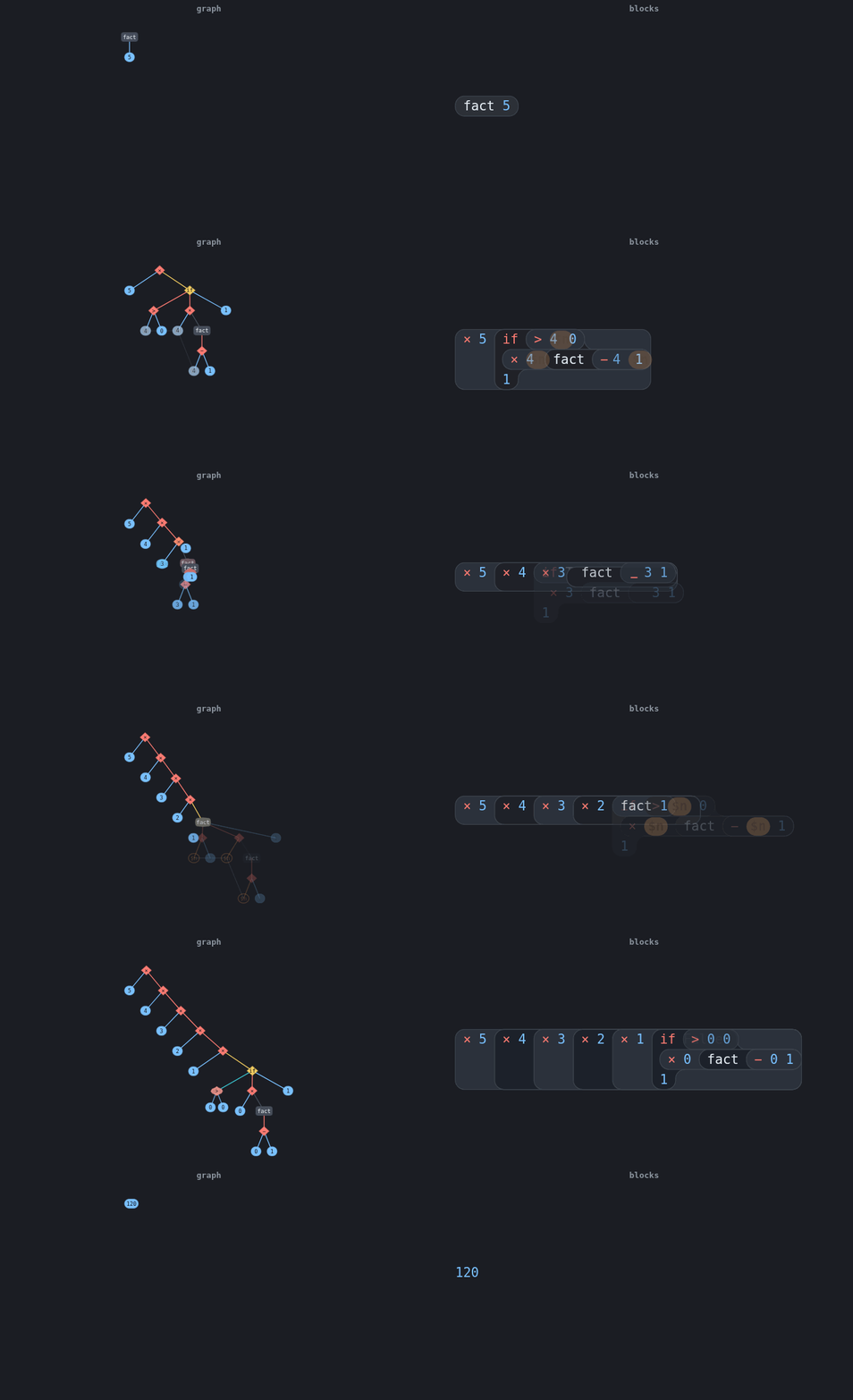
The graph is a free-form canvas. A node with children composes to (name child…), argument order is screen order, and shape and color follow the syntax:
- a variable is a hollow circle, an open slot with no fill,
- a number a blue pill,
- a control form like
if,case, ormatchan amber decision diamond, - an operator, shown as its math glyph (
*becomes×,>=becomes≥), a red diamond, - a headless expression a green hexagon,
- and everything else a neutral rounded box.
Double-click empty space to add a node and double-click a node to evaluate it. Drag a node's top dot onto another to connect it as a child: the line turns green over a node it can legally join and red over one it cannot (itself, a duplicate, or a cycle). Drag that dot onto empty space instead to detach the node from its parents. Select a node and press Delete or Backspace to remove it and its connections; drag a box around several nodes to select them all.
Try it: on the Arithmetic example, drag the top dot of a number onto the + node to add it as another argument, then drag that same dot onto blank canvas to detach it again, watching the source panel below the picture change with each edit. Right-drag or hold Space to pan, and the wheel zooms toward the cursor.
The blocks view is projectional: nesting is containment, so (* $n (fact (- $n 1))) is a block holding *, $n, and the fact block inside it. There are no wires to arrange, the layout is automatic, and a variable is drawn as a hole. The colors match the syntax highlighting in the code blocks around this page.
Editing in the blocks view
The blocks view is a small structure editor. You never type into a free-form text box; you select a term and act on it, so the program is always a valid tree.
Select and move the cursor. Click any term to select it. A red outline and a handle mark the selection. The arrow keys walk the cursor through the tree:
- Right and Left step through the whole tree in order (into a form, then across its parts, then back out).
- Down enters the first child of the selected form.
- Up returns to the parent.
Type to edit a term. With a leaf selected (a symbol, a number, or a variable hole), start typing. What you type replaces the term, and when you press Enter it is re-parsed back into an atom: 42 becomes a number, $x a variable, foo a symbol. The change shows up immediately in the source panel below the canvas, so typing in the picture and reading the text stay in step. Press Escape to cancel an edit, and Backspace to fix a character.
For example, select the 5 in (fact 5), type 9, and press Enter: the block becomes (fact 9) and the source reads (fact 9).
Reduce a term in place. Double-click a form, or select it and press Enter, to rewrite it one step: (+ 10 (* 25 2)) becomes (+ 10 50), then 60. This is one real reduction on the interpreter, the same engine the rest of the site uses, so a rule you wrote a few blocks over is applied just as it would be in a query. Back undoes the last reduction or edit, one step at a time.
Playing a reduction
Press Play to animate a query's whole reduction from start to finish. The tree folds up to its answer, morphing smoothly from one state into the next rather than jumping, in either view: shared parts glide to their new place while the rewritten part changes.
Two things guide your eye. A soft glow, tinted the color of whatever is reducing, sits over the redex, the subterm being rewritten this step, so you always see where the action is. And a finished step's consumed pieces do not blink out: they travel into the result and coalesce into it, the way two droplets merge, so (* 3 2) shows the 3, the 2, and the × melt together into 6. An operation that produces a value morphs in place, the × diamond becoming the 6 pill.
When a rule fires, you see the substitution happen. Reducing (fact 3), the play first shows the rule's body with its variable as a hollow slot, (if (> $n 0) (* $n (fact (- $n 1))) 1), and then fills each $n slot in with the 3 it matched. The slot and the value are both real: the body is read back from the rule you wrote, so a literal in the rule (the 1 of the base case, the 1 in (- $n 1)) stays a 1 and is never mistaken for the variable. A step with more than one result fans out instead, so a nondeterministic (coin) shows Heads and Tails side by side, every branch at once. The controls:
- the speed slider sets the pace: it slows the morph itself, so a low speed is watchable, not just a longer wait between steps,
- Prev and Next step by hand,
- Play at the end replays from the beginning,
- Reset returns to the editable program,
- Export GIF saves the animation as a file you can drop into a README or a slide.
Driving the picture from MeTTa
The graph can change its own appearance. Alongside the program's own space &self, the editor watches a second space, &grapher: add a directive atom to it and the matching node updates. Because the directives live in their own space, they never mix with your program's atoms, and your program never trips over them.
The canvas turns a deep blue, the (fact 5) node turns red and gets an "answer" label, and the if node is ringed. The vocabulary is four directives:
(color TARGET COLOR)fills the node, where COLOR is a name likeredor a#hex.(highlight TARGET)rings it.(focus TARGET)frames it.(label TARGET TEXT)writes text above it.(background COLOR)themes the whole canvas. This one is global, so it takes a color and no target, and the redex glow re-reads it to stay legible on whatever background you set.
A TARGET is either a node's name, like if, which reaches every if node, or the term a node stands for, like (fact 5). Since directives are ordinary atoms, a rule can compute them: have your program add-atom a (color $x red) for each $x it decides is interesting, and the graph follows. The term you write is kept exactly as written, so (color (fact 5) red) points at the (fact 5) node, not at its result.
How it maps to MeTTa
- A symbol node with children composes to
(name child…); without children it is the bare symbol, a variable when the name starts with$, or a grounded value when it is a number. - A list node is a headless expression
(child…), so(f)stays distinct fromf. - Argument order is screen order. Children sort left to right, ties top to bottom, so
(- 5 3)is the-node with5placed left of3.
Nodes form a cycle-guarded graph, so a node can feed several parents and no cycle can form. Evaluating a node composes the atom for the tree it belongs to and shows the result beneath the top node.
Using it from TypeScript
The package is @metta-ts/grapher. The quickest way in is the fluent grapher() driver, in the same style as the eDSL:
import { grapher } from "@metta-ts/grapher";

grapher("#app")
  .load("(= (double $x) (* $x 2))\n(double 21)")
  .blocks() // or .graph()
  .play(); // animate the reduction
Every building step returns the handle, so a chain reads as one sentence. source(), gif(), and destroy() end the chain, and .grapher is the full instance for anything the chain does not cover.
Because the view runs on atoms, anything that produces atoms feeds it, including the eDSL. Build the program with combinators and hand the atoms over:
import { grapher } from "@metta-ts/grapher";
import { rule, names, vars, If, gt, mul, sub } from "@metta-ts/edsl";

const { fact } = names();
const { n } = vars();

grapher("#app")
  .atoms([rule(fact(n), If(gt(n, 0), mul(n, fact(sub(n, 1))), 1)), fact(5)])
  .blocks()
  .play();
Recolor the blocks with a built-in name or your own palette:
grapher("#app").blocks().palette("teal"); // "site" (default), "teal", or a palette objectExporting a GIF from code
gif() encodes the reduction as an animated GIF. It takes the encoder as an argument, so the package carries no GIF dependency of its own: install gifenc where you want the feature and pass it in.
const blob = await grapher("#app").load("(fact 5)").gif(await import("gifenc"));
// blob is an image/gif Blob you can download, upload, or turn into an object URL
The full instance
For everything else, use the class directly:
import { MeTTaGrapher } from "@metta-ts/grapher";

const editor = new MeTTaGrapher(document.getElementById("app")!, {
  source: "(+ 10 (* 25 2))",
});
editor.evaluateAll(); // run every head
editor.setViewMode("block"); // switch to the blocks
editor.toSource(); // "(+ 10 (* 25 2))"
loadSource and loadAtoms swap the whole program, save() returns the graph as JSON, and load(json) restores it exactly, positions and all. The embedded editor on this page keeps its live instance on the canvas element, so from the browser console you can drive it directly:
const g = document.querySelector(".mg-canvas").grapher;
g.loadSource("(+ 1 2)");
g.setViewMode("block");